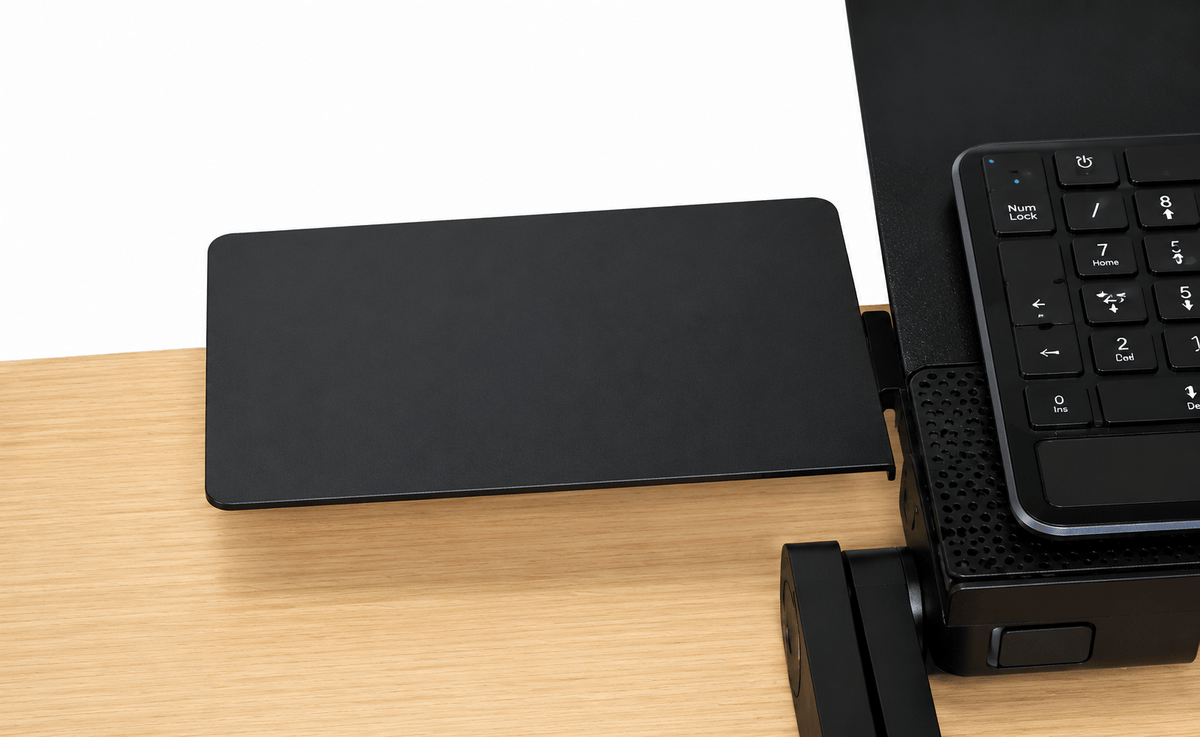
WorkEZ Mouse Pad Replacement + Accessory
Give the mouse its own stable surface - but choose the correct WorkEZ version first
WorkEZ Mouse Pads add dedicated mouse space to compatible WorkEZ stands and keyboard setups. There are two different versions, and they attach differently: the Universal WorkEZ Mouse Pad clamps to the leg of a WorkEZ stand, while the WorkEZ Keyboard Tray Mouse Pad connects directly to the WorkEZ Keyboard Tray panel.
Both versions can be used on the right or left, remove easily when you do not need them, and create a separate surface for the mouse or small accessories.
Small accessory, much better workspace
Stop balancing the mouse wherever there happens to be room
More usable workspace
Give the mouse its own platform instead of crowding the main stand.
Model-specific fit
Choose the attachment style that matches the WorkEZ setup you own.
Ambidextrous placement
Install the platform on either side of the workstation.
Use it only when needed
Attach, reposition, or remove the platform as the setup changes.
Mouse pad or mini shelf
Use the surface for a mouse or compatible small accessories.
Choose the correct version
These two mouse pads are not interchangeable
Clamps to the leg of a WorkEZ stand
Choose this version when your WorkEZ setup needs a mouse surface that attaches to the stand leg rather than directly to a keyboard panel.
- Screw-clamp attachment.
- Installs on the right or left.
- Adjustable and easily removable.
- Foam wrist rest included.
- Can also hold compatible small accessories or drives.
- Approx. 6.2 × 10.0 in.
- ABS + foam construction.
Connects directly to the WorkEZ Keyboard Tray panel
Choose this version only for the WorkEZ Keyboard Tray. It attaches to the tray panel rather than clamping to a WorkEZ stand leg.
- Designed specifically for WorkEZ Keyboard Tray.
- Installs on the right or left.
- Adjustable and removable.
- Can also serve as a small accessory shelf.
- Approx. 7 × 7 in.
- Aluminum construction.
Before ordering: identify which WorkEZ product you own and choose the matching mouse-pad attachment. The Universal version clamps to a stand leg. The Keyboard Tray version connects to the WorkEZ Keyboard Tray panel.
Quick comparison
Pick the version by attachment point - not just by size
| Feature | Universal WorkEZ Mouse Pad | WorkEZ Keyboard Tray Mouse Pad |
|---|---|---|
| Attachment | Clamps to a WorkEZ stand leg | Connects to WorkEZ Keyboard Tray panel |
| Primary compatibility | WorkEZ stands using the leg-clamp attachment | WorkEZ Keyboard Tray only |
| Side | Right or left | Right or left |
| Removable | Yes | Yes |
| Approx. size | 6.2 × 10.0 in | 7 × 7 in |
| Material | ABS + foam | Aluminum |
| Wrist rest | Foam wrist rest included | Not listed |
| Secondary use | Small accessory or drive shelf | Small accessory shelf |
A mouse pad should solve a problem, not create another one
Keep the mouse beside the keyboard instead of reaching for furniture around you
Dedicated mouse space makes mobile and compact setups easier to live with
WorkEZ products are often used in places where traditional desk space is limited. A dedicated mouse platform keeps the pointing device beside the main work surface instead of forcing you to use the couch, bed, counter edge, or another improvised surface.
Because both versions are removable and can be placed on either side, the accessory can adapt when the user, room, or workstation changes.
Frequently asked questions
WorkEZ Mouse Pad questions
Are there two different WorkEZ Mouse Pads?
Yes. The Universal WorkEZ Mouse Pad clamps to a WorkEZ stand leg. The WorkEZ Keyboard Tray Mouse Pad connects directly to the WorkEZ Keyboard Tray panel.
Which version should I order?
Choose based on the WorkEZ product and attachment point you own. If your mouse pad needs to clamp to a stand leg, choose the Universal version. If you own the WorkEZ Keyboard Tray and need the panel-mounted mouse pad, choose the Keyboard Tray version.
Can either version be installed on the left or right?
Yes. Both versions support right- or left-side placement.
Can I remove the mouse pad when I do not need it?
Yes. Both versions are designed to be removable.
How large is the Universal WorkEZ Mouse Pad?
The Universal version measures approximately 6.2 × 10.0 in and is made from ABS + foam.
How large is the WorkEZ Keyboard Tray Mouse Pad?
The Keyboard Tray version measures approximately 7 × 7 in and uses aluminum construction.
Can the platform hold anything besides a mouse?
Yes. The current product information also describes the platforms as useful for compatible small accessories or drives when the surface is not needed for a mouse.
What's the size of the WorkEZ Mouse Pad?
6.75"(w) x 7.0" (d). Click the SPECS tab on the WorkEZ Mouse Pad webpage to learn more
How does the WorkEZ Mouse Pad connect to a WorkEZ Stand?
WorkEZ Mouse Pad clamps to the leg of any WorkEZ Stand. For installation instructions, watch the videos or download the user manual available on the WorkEZ Mouse Pad webpage.
Is the WorkEZ Mouse Pad included with the WorkEZ Keyboard Tray?
No. WorkEZ Keyboard Tray comes with its own, unique mouse pad.
The screw holding the mouse pad is getting loose. What should I do?
Aluminum is a soft metal. Frequent screwing and unscrewing can expand the hole. You can try a different hole or pick up a nut from your local hardware store to ensure a tight fit every time!
| Type | Value |
|---|---|
| Material | ABS + Foam |
| Weight capacity | 1 lb |
| Attachment mechanism | Screw Clamp |
| Description | NEW for 2019! Larger with wrist wrest! An adjustable, removable tray that clamps to the leg of any WorkEZ Stand. |
| Product weight | .25 lbs |
| Size | 6.2" wide by 10.0" long |
| Compatible with | All WorkEZ Stands, All common mice |
|
Workez keyboard tray introduction an ergonomic adjustable height & angle computer keyboard stand Stand up and type more comfortably with the adjustable height & angle WorkEZ Keyboard Tray. This ergonomic stand up keyboard riser properly positions keyboards and mice to optimize your typing posture. Raise keyboard to elbow-height and type with a neutral or negative tilt for optimal wrist health. Excellent as both a seated and adjustable standing desk keyboard tray, it’s a simple, convenient way to elevate and tilt keyboards for a more comfortable typing experience. Includes 2 pieces: 1. KEYBOARD TRAY: * WIDE PANEL: Approx. 18" left-to-right by 11” front-to-back panel comfortably holds most keyboards and gives ample room for wrist support. * NEGATIVE TILT: Panel rotates and locks in 15-degree increments, letting you type with a flat- or downward-angle for optimal wrist health. * ADJUSTABLE HEIGHT: Position keyboards at almost any height from flat on your desk up to ~18 inches high - perfect for standing. * Material: Lightweight, durable aluminum. 2. MOUSE PAD * Holds mice in perfect alignment with the keyboard * 7x7 inch size is large and comfortable * Connects to the left or right side of the panel * Easily adjust the mouse pad's angle * Material: Lightweight, durable aluminum The WorkEZ Keyboard Tray & Mouse Pad is an ideal adjustable, ergonomic computer keyboard stand that elevates keyboards to a comfortable typing height and has a tilting panel for enhanced typing comfort. It’s the perfect standing keyboard tray & a simple, effective keyboard stand that can improve your posture and comfort when typing. The WorkEZ Keyboard Tray was designed by and is exclusively manufactured by Uncaged Ergonomics. |
|
Introducing workez keyboard tray ergonomic adjustable height angle negative tilt standing computer k Stand up and type more comfortably with the adjustable height & angle WorkEZ Keyboard Tray. This ergonomic stand up keyboard riser properly positions keyboards and mice to optimize your typing posture. Raise keyboard to elbow-height and type with a neutral or negative tilt for optimal wrist health. Excellent as both a seated and adjustable standing desk keyboard tray, it’s a simple, convenient way to elevate and tilt keyboards for a more comfortable typing experience. Includes 2 pieces: 1. KEYBOARD TRAY: * WIDE PANEL: Approx. 18" left-to-right by 11” front-to-back panel comfortably holds most keyboards and gives ample room for wrist support. * NEGATIVE TILT: Panel rotates and locks in 15-degree increments, letting you type with a flat- or downward-angle for optimal wrist health. * ADJUSTABLE HEIGHT: Position keyboards at almost any height from flat on your desk up to ~18 inches high - perfect for standing. * Material: Lightweight, durable aluminum. 2. MOUSE PAD * Holds mice in perfect alignment with the keyboard * 7x7 inch size is large and comfortable * Connects to the left or right side of the panel * Easily adjust the mouse pad's angle * Material: Lightweight, durable aluminum The WorkEZ Keyboard Tray & Mouse Pad is an ideal adjustable, ergonomic computer keyboard stand that elevates keyboards to a comfortable typing height and has a tilting panel for enhanced typing comfort. It’s the perfect standing keyboard tray & a simple, effective keyboard stand that can improve your posture and comfort when typing. The WorkEZ Keyboard Tray was designed by and is exclusively manufactured by Uncaged Ergonomics. |
Great with one exception
Really enjoy the quality of this product. I haven’t been able to use it as pictured (it slides down the leg despite being fully tightened) but it rests at a manageable height for my uses.
Perfect for a Trackpad
I can't speak to how well this works with a traditional mouse, but I can say that it is perfect for a trackpad. It's plenty large enough for Apple's Magic Trackpad, and it works great. The mechanism for attaching it to the Work EZ Light stand makes for a secure connection, and I have no complaints about it at all. Well made, and well worth the price.
